








Continue to https://bloodycase.com/ to inspect the current catalog, prices and conditions.
Links to the official BloodyCase site are independent and earn no commission. →
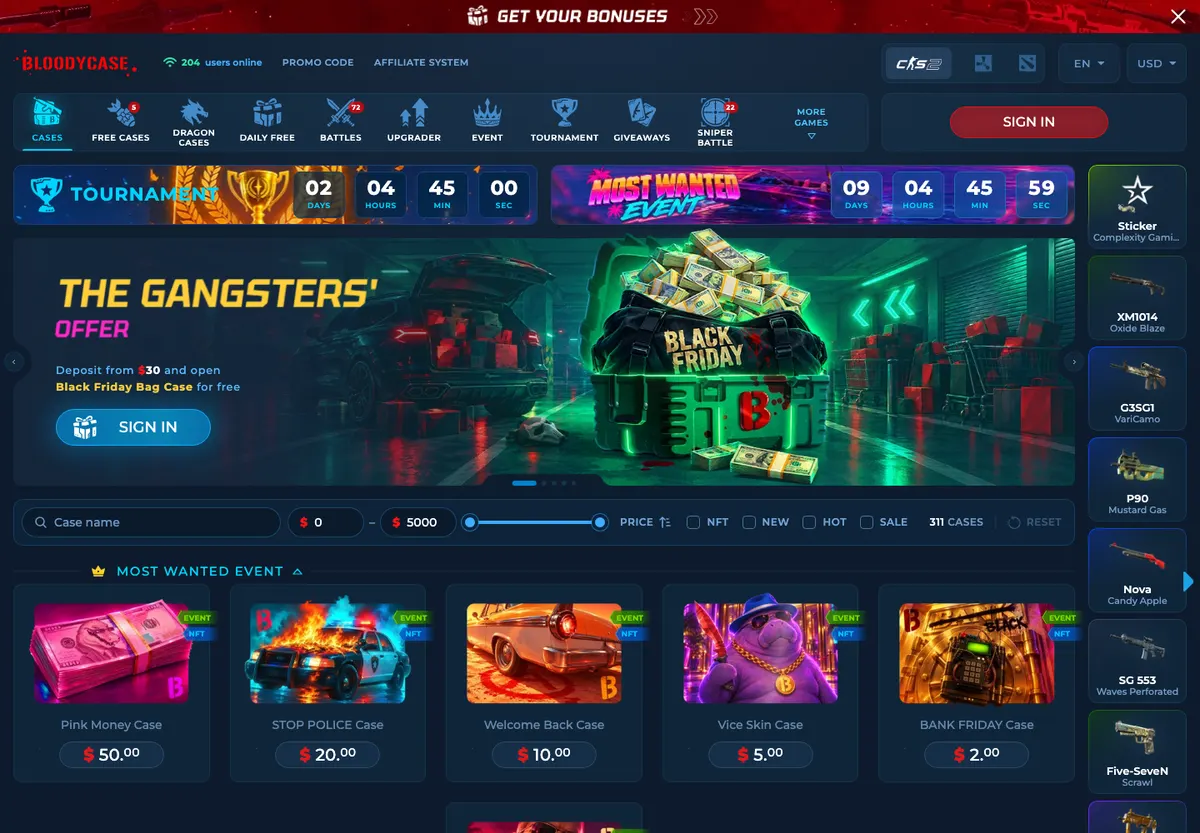
BloodyCase at a glance
The main attraction is the choice between straightforward case opening and modes that use skins as stakes. You can keep a drop for withdrawal, sell it back for balance, or put it into another supported activity. Those are different decisions with different risks. Selling for balance keeps the value on the site; using a skin in another chance-based mode exposes it to another possible loss. Neither action is the same as receiving the item in your Steam inventory.
The user and case totals are counters displayed by BloodyCase. They describe activity, not your chances of receiving a particular skin, the value of a future drop or the speed of a withdrawal. For a fuller assessment of the features and practical limitations, read the BloodyCase review.
Find cases for the game you actually play
BloodyCase lists CS2, Rust and Dota 2 cases. That does not mean every item, variant or feature is interchangeable across those games. Start with the game catalog, then inspect the exact items in a case rather than assuming that a familiar thumbnail identifies everything about the potential drop. If you want a particular cosmetic rather than a random result, opening a case is not a reliable substitute for obtaining that known item directly.
| Game | Documented BloodyCase offering | Useful item checks |
|---|---|---|
| CS2 | Skin cases | Exact weapon and finish, wear condition, and any special variant such as StatTrak. |
| Rust | Skin cases | Exact item name, item category and whether it is the cosmetic you intend to receive. |
| Dota 2 | Skin cases | Exact cosmetic, applicable hero or slot, and any item-specific trading restrictions. |
As general CS2 item guidance, wear describes a skin's visual condition, while float is the underlying numerical wear value. Rarity is a separate classification; it is not the same as wear, price or the probability assigned by a third-party case. StatTrak variants are also distinct from their ordinary counterparts. When comparing an item shown on BloodyCase with a Steam listing, compare the complete identity rather than the artwork alone. The supported-games guide and skin terminology glossary explain these distinctions without treating general Steam conventions as BloodyCase rules.
Choose a mode by what you are putting at risk
BloodyCase's navigation includes ordinary cases, promotional case categories, battles, upgrades, contracts and other activities. Their names do not establish identical rules. Before participating, identify the entry cost, what is staked, how the result is decided and what happens to the items afterward. Changing the presentation of a chance-based activity does not remove its house edge.
| Mode | What BloodyCase documents | Before taking part |
|---|---|---|
| Cases | Cases can be opened without buying separate keys. | Check the case price, possible contents and displayed probabilities. |
| Case battles | Participants open the same cases; the highest total drop value takes all drops. | Understand that your own drops do not ensure you retain anything. |
| Upgrader | Stake skins, optionally with balance, for a more expensive target; chance depends on the value ratio. | Check the target, stake valuation, chance and loss conditions. |
| Contract | Won skins can be used in Contract mode. | Read the current input requirements and outcome rules before committing items. |
| Dragon cases | A deposit-linked promotional system with 10 levels. | Assess the deposit conditions separately from the promotional case. |
| Sniper battles, events, tournaments and giveaways | These activities appear in the site's navigation. | Read their individual rules rather than applying ordinary battle rules. |
Ordinary cases: separate the opening from the outcome
The no-key model removes a separate purchasing step, not the uncertainty of the drop. Paying for an opening does not mean receiving an item worth the amount spent. Inspect the entire contents rather than focusing on the most expensive pictured item. If probabilities or the final price are unclear, stop before confirming. A previous disappointing opening does not make a better result due, and an appealing animation is not evidence of how likely an item was. Use the cases guide for a focused opening checklist.
Case battles: the comparison decides who keeps the drops
In BloodyCase case battles, several users open the same cases and the participant with the most valuable total drop takes all the drops. This adds a competitive outcome to the underlying case results. Receiving a desirable skin during the battle is therefore not enough: another participant can finish with a higher total. BloodyCase also states that fully private battles cannot be created. Do not enter expecting a closed session restricted to your own group. Check the complete battle setup and current rules before paying the entry cost.
Upgrades: a target skin is not a promised exchange
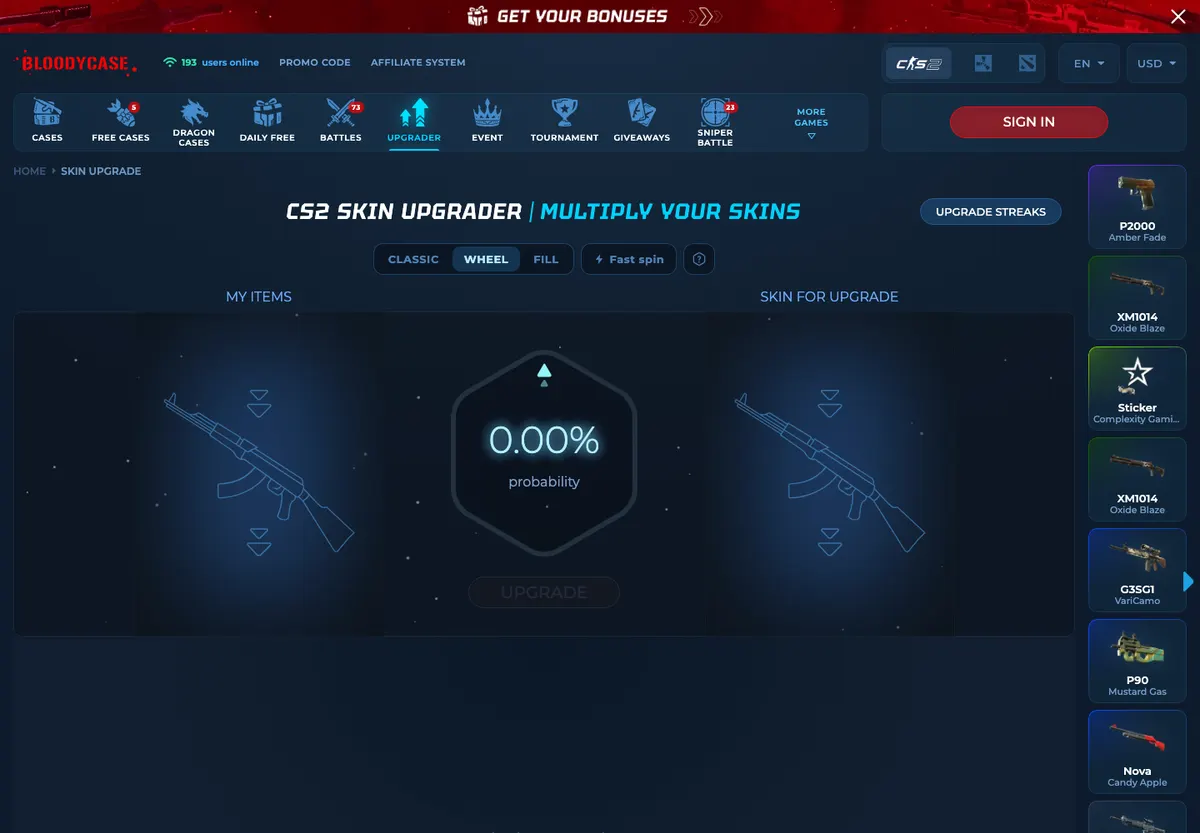
The Upgrader accepts skins and optional balance toward a more expensive target, with the chance based on the value ratio. On a loss, the staked skin or balance is lost, although BloodyCase says cashback is credited. Cashback does not make the attempt loss-free, and no cashback rate should be assumed. The listed displays include Upgrade strip, Classic, Wheel and Fill; a different visual layout is not evidence of better chances. Review the actual stake and probability, not the animation. See all game modes for a closer comparison.
Start with an account and a plan for receiving items
BloodyCase lists Steam, Google, Discord, Facebook and Twitch as registration or login options. Choosing a convenient sign-in method is only the account-access step. Receiving a skin still involves the correct Steam account and an eligible trade. The following sequence combines documented BloodyCase features with general account-safety checks.
- Confirm eligibility before creating an accountCheck the current official terms for your location and legal age. Access to a page, an available language or a visible payment method does not establish that participation is permitted where you are.
- Open the correct official destinationUse https://bloodycase.com/ and inspect the address before signing in. As general security practice, enter Steam credentials only through the genuine Steam authentication flow, not a lookalike form sent in a message.
- Secure the Steam account that will receive itemsUse Steam Guard and check the account for trading restrictions. Keep recovery details secure. Where a trade URL is requested, obtain it from your own Steam account and check that it belongs to the intended receiving profile.
- Review payments and set a spending limitThe published deposit minimum is $5. Inspect the method available to you, the amount to be charged and the balance to be credited. Set an entertainment budget before funding and do not increase it to recover earlier losses.
- Read the specific activity's rulesCheck the case contents or mode conditions, the complete stake and the possible loss. Do not use the ordinary case rules to fill in missing details for a tournament, Contract or sniper battle.
- Choose what to do with any resulting skinBloodyCase allows won skins to be withdrawn to Steam, sold for balance or used in Upgrade and Contract modes. Decide deliberately: keeping an item, selling it back and staking it again have different consequences.
For account-access details, use the login guide. For the complete journey from account setup to an item trade, follow how BloodyCase works. Neither signing in nor setting up Steam requires you to proceed with a deposit.
Continue to https://bloodycase.com/ and check the options and final charge available for your location.
Links to the official BloodyCase site are independent and earn no commission. →
Check payment availability and the full cost
BloodyCase lists card, e-wallet, cryptocurrency and other payment options, but explicitly says methods may vary by country of residence. Treat the published list as an indication of supported payment channels, not a promise that every logo will appear in your account. The $5 minimum is also not a complete statement of cost: the checkout terms for the selected method still matter.
| Payment route | Examples listed by BloodyCase | Practical check before confirming |
|---|---|---|
| Cards | Visa, Mastercard | Check the charge currency, credited balance and any issuer or conversion costs. |
| Wallets and local services | Skrill, Neteller, PayPal, Zen, Sofort | Confirm availability for your residence and read the final payment summary. |
| Prepaid options | Paysafecard, Neosurf | Check the method-specific instructions and any restrictions shown at checkout. |
| Cryptocurrency | USDT, Bitcoin, Ethereum, Litecoin and others | Match the asset, network and destination instructions exactly. |
| Skin-related payment service | SkinsBack | Read the item valuation and trade instructions before authorizing a transfer. |
The public overview does not specify a complete fee schedule or a universal processing timetable. Do not assume deposits, item sales or withdrawals are fee-free, and do not treat an on-site skin valuation as a promised resale price elsewhere. Compare the amount leaving your payment account with the balance credited, then review the amount charged for the activity itself. The fees guide separates published figures from costs that need checking at checkout.
A deposit method is not automatically a withdrawal method. The documented item route is withdrawal to Steam; selling a drop returns site balance. Neither establishes a bank, wallet or cryptocurrency cash-out facility. General crypto risks also remain relevant: digital assets can fluctuate in value and have a history of theft and hacking. Paying with cryptocurrency does not reduce the uncertainty of a case result.
Receive skins through Steam without skipping trade checks
BloodyCase says won skins can be withdrawn to your Steam account and that exchanges run automatically through Steam bots. It also states that withdrawing items requires a balance top-up of at least $5. That requirement matters even if an item came from a promotional case. Automatic handling does not remove the need to inspect a Steam offer, and a withdrawal request on the site is not the same as confirmed receipt in Steam.
- Check the receiving account: make sure the Steam profile and any saved trade URL are yours.
- Read both sides of the offer: confirm the expected item and inspect anything requested from your inventory.
- Compare the complete item identity: name, game, wear and special variant can matter.
- Treat unexpected replacement offers or messages asking for a separate transfer as warning signs.
- Check the final status in Steam rather than relying only on an animation, notification or chat message.
Understand Steam holds before assuming a payout problem
As general Steam guidance, a trade hold means Steam keeps items for a period before delivery. Valve explains that this gives the owner of a compromised account an opportunity to cancel a fraudulent trade. Steam Guard's mobile authenticator supports account security and trade confirmations, but current account and item restrictions still need checking in Steam. These are Steam mechanisms, not a BloodyCase processing-time promise. Do not apply an advertised fast-transfer claim to every item or account situation.
Steam Trade Offers package the items proposed on both sides, so the offer itself is the important confirmation screen. Steam Community Market sales are different again: they use Steam Wallet funds and show Valve fee lines. A BloodyCase balance, a Steam inventory item and Steam Wallet funds are therefore separate things. For troubleshooting and a fuller security checklist, see deposits and withdrawals and trade safety.
Use provably fair verification for the right question
BloodyCase states that its provably fair algorithm applies to all openings, including battles, and that results can be verified using server seeds. This addresses how a result can be checked. It does not mean the player has an advantage, that every item is equally likely or that an opening will return its cost. The public overview does not give a numerical house-edge figure, so none should be inferred from the phrase “provably fair.”
In a typical provably fair design, a cryptographic hash commits to a secret server seed before a result. The seed can later be revealed so the calculation can be checked against that commitment. Some systems also use player-controlled inputs and a round counter. These are general concepts, not a claim that BloodyCase uses every component in that exact arrangement. Follow the site's actual verification instructions for the mode involved.
- Find the verification information before playing, rather than only after a disputed result.
- Keep the relevant result identifier and any seed or commitment information the interface makes available.
- Check both the underlying result calculation and how it maps to the displayed outcome.
- Keep fairness verification separate from questions about item valuation, fees, account access and withdrawal delivery.
The practical test is whether you can follow and reproduce the published check, not whether the animation looks convincing. If you cannot locate the required information, ask support before staking anything further. The provably fair guide explains the terminology and the limits of what this type of verification can establish.
Read promotional case conditions before depositing
BloodyCase advertises a new-user bundle of 5 promotional cases, but the stated condition is a mandatory $5 deposit to unlock them, and each user can open the bundle only once. Calling a case promotional does not make the whole route costless. The separate requirement for withdrawing items also needs attention. Read the current offer terms together with the withdrawal conditions instead of judging the promotion by the number of cases alone.
Dragon Cases use a different structure: BloodyCase describes a 10-level system tied to cumulative deposits. That makes the qualifying funding part of the decision, not a detail to ignore. A higher promotional level is not a reason to exceed a budget you already set. Other daily or event-related entries may have their own conditions; do not transfer the welcome-bundle rules to them.
Before using any offer, identify who qualifies, what funding is required, what the reward actually is and how resulting items can be used or withdrawn. Do not assume a promotional balance is withdrawable money, or that a code found elsewhere is valid. If the conditions would lead you to spend more than planned, skip the offer rather than treating the extra spending as a saving.
Decide whether the format matches your goal
The clearest reason to consider BloodyCase is its documented combination of no-key cases, several game catalogs and alternative modes using skins. That combination suits a different goal from buying an exact cosmetic. If certainty about the item matters most, a random opening works against that goal. Likewise, if your aim is to turn an existing inventory into money, site-balance sales should not be confused with a cash marketplace.
- For a particular skin: compare ways to obtain the known item rather than assuming a case will deliver it.
- For adult entertainment with random outcomes: understand the full stake and accept that it may be lost.
- For Steam delivery: check account eligibility and withdrawal conditions before funding.
- For cash proceeds: do not infer cash withdrawal from payment logos or the option to sell a drop for balance.
BloodyCase's footer names Sky Apex Group Ltd, registration code HE491931, in Limassol, Cyprus, and the site states it is not affiliated with Valve. A company registration and Steam integration are not gambling licences or regulator approval. Check the rules applicable to your location rather than assuming that a reachable website is authorized for you.
Resolve problems without making another payment
If something goes wrong, identify which stage failed before taking another action. A sign-in problem, a payment-status question and a pending Steam trade involve different systems. Depositing again or repeatedly starting the same action can make the situation harder to understand. These are general troubleshooting steps, not promised BloodyCase resolution times.
- If sign-in failsCheck the official destination and confirm which account provider you originally used. Inspect any error message before changing settings. Never send a password, Steam Guard code or recovery code to someone offering to repair access.
- If a payment is unclearCompare the payment provider's status with the site balance and retain the transaction reference. For cryptocurrency, retain the transaction identifier and network details. Ask support about the existing payment before attempting another deposit.
- If an item has not arrivedCheck the withdrawal status, receiving profile and Steam offer history. Distinguish no offer, a pending offer and a Steam hold. Record the item name and relevant reference, but do not accept an unrelated offer as a replacement.
BloodyCase advertises support at support@bloodycase.com, available 24/7. That describes support availability, not a guaranteed response or resolution time. Prepare a concise explanation, account identifier, relevant timestamps, transaction or trade references, and screenshots with sensitive details removed. The support guide explains what to include and what to keep private.
Keep spending and stopping decisions under your control
Case opening, battles and upgrades carry a house edge and are not a way to earn money. Only participate if you are an adult aged 18+ and meet any higher local age requirement. Use money you can afford to lose, set a stopping point before starting, and keep essential spending separate. An item already in your site inventory still has value; staking it again is another spending decision, even when no fresh deposit is involved.
Pause if you begin chasing losses, borrowing, hiding activity or repeatedly extending a session. Do not let a promotional level or a disappointing result determine your next deposit. If stopping becomes difficult, seek local gambling support and ask the operator about available account restrictions or closure options. No particular self-exclusion tool is assumed here. The responsible-gambling guide provides further practical guidance.
Before you continue: a short checklist
- Confirm that your age and location meet the current official terms.
- Choose the game and mode, then read the exact entry and outcome rules.
- Check the final payment amount; the published minimum deposit is $5.
- Remember that promotional cases can require a deposit and item withdrawal requires a qualifying top-up.
- Separate site balance, Steam items and Steam Wallet funds.
- Secure your Steam account and inspect every trade offer.
- Set a spending limit and stop rather than trying to recover losses.
BloodyCase questions answered
No matching questions found.
What is BloodyCase?
Do BloodyCase cases need keys?
What is the minimum deposit on BloodyCase?
Can I withdraw BloodyCase skins to Steam?
Can I sell a drop for cash?
How do BloodyCase battles work?
Is BloodyCase provably fair?
Are the welcome cases available without a deposit?
How do I contact BloodyCase support?
Continue to https://bloodycase.com/ to check current cases, rules and eligibility before deciding whether to participate.
Links to the official BloodyCase site are independent and earn no commission. →
This independent guide is for informational purposes and is not affiliated with BloodyCase.