







If your goal is to receive a BloodyCase skin without exposing your Steam account, start with the documented withdrawal process and verify the actual offer. BloodyCase says exchanges run automatically through Steam bots, won skins can be withdrawn to Steam, and openings use a provably fair system. Those statements describe different parts of the service; they do not make every message, bot profile or transaction trustworthy. There is no blanket safety verdict that replaces checking the destination, your account security, the items being exchanged and Steam’s current restrictions.
For information about BloodyCase’s withdrawal process, see https://bloodycase.com/. Its UK licensing status is unverified.
Links to the official BloodyCase site are independent and earn no commission. →
Start with what BloodyCase actually documents
BloodyCase describes a case-opening service with Steam item withdrawals, not a promise that any Steam account using its name is authorised. Its footer names Sky Apex Group Ltd as the operator, and the site states that it is not affiliated with Valve. A company identity helps identify the service you are dealing with, but it is not, by itself, proof of regulatory approval, local availability or transaction security.
| Documented statement | What it helps establish | What you still need to check |
|---|---|---|
| Exchanges run automatically through Steam bots. | An automated Steam offer is part of the described exchange process. | Whether this specific offer corresponds to the transaction you initiated. |
| Won skins can be withdrawn to Steam or sold for site balance. | Receiving an item and retaining site balance are different choices. | Which action you selected and what remains in your site inventory. |
| A balance top-up of at least $5 is required for item withdrawal. | Withdrawal has a documented funding prerequisite. | Any other current conditions shown for your account and item. |
| Openings, including battles, use a provably fair system with server-seed verification. | The site describes a way to check opening results. | The verification procedure; this does not authenticate a Steam bot. |
| Support is advertised as available 24/7 at support@bloodycase.com. | There is a published contact route for transaction questions. | The actual reply and resolution; availability is not a response-time guarantee. |
BloodyCase’s general withdrawal information does not publish a universal delivery deadline, a bot-identification checklist or an exact Steam Guard waiting period. Do not fill those details in from a chat message or another skin website’s rules. Read the current transaction screen and terms, and ask official support before committing if an essential condition remains unclear.
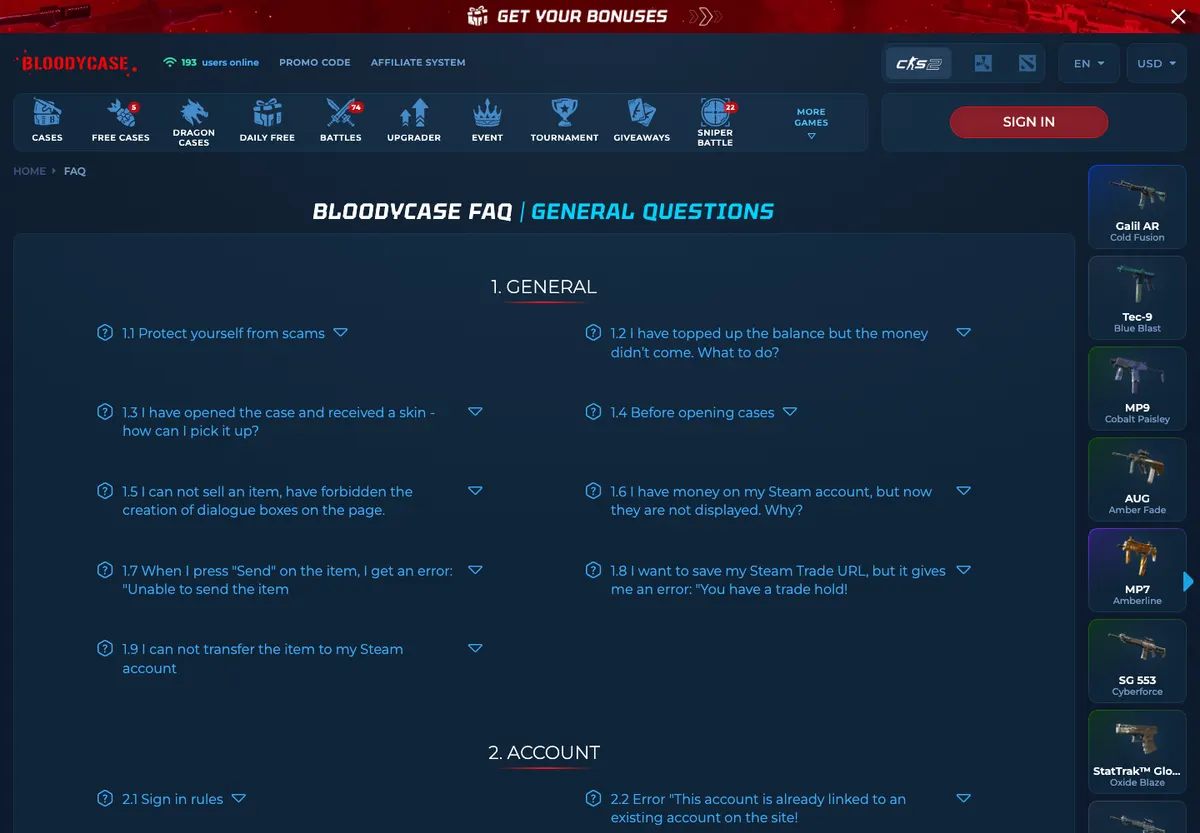
The official BloodyCase FAQ is a useful starting point for service instructions. Use current information on the official site alongside the live Steam offer; a screenshot cannot establish the identity or contents of a transaction arriving later.
Secure Steam before connecting a withdrawal
The following is general Steam security guidance, not a list of additional BloodyCase requirements. Valve describes the Steam Guard Mobile Authenticator as providing two-factor authentication for trade and market confirmations. Its purpose is to add an approval layer beyond your password. It is useful only if you read what you are approving and keep the account’s recovery routes secure.
- Use a unique Steam password and secure the email account connected to it. A protected Steam password is not enough if someone controls password recovery.
- Enable and maintain Steam Guard through Steam’s own tools. Keep recovery information private and stored somewhere you can access safely.
- Review account sessions and unfamiliar authorisations through Steam. Investigate access you do not recognise before initiating another trade.
- Avoid browser extensions or downloaded tools advertised as necessary to verify, price-check or unlock a withdrawal.
- Open Steam independently when checking a confirmation. Do not let a message sender guide you through approving an unfamiliar login or trade.
- Secure whichever external account you use to access BloodyCase, as well as the Steam account intended to receive the item.
BloodyCase lists Steam, Google, Discord, Facebook and Twitch as login or registration options. That does not make the security of those accounts interchangeable. Access to the website and authority to move Steam inventory are separate concerns. If you use a social login, confirm that you are in the intended BloodyCase account and that any receiving Steam details are yours. See the BloodyCase login guide for account-access checks.
A login request is not a trade confirmation
Before approving anything on your phone, identify the action being authorised. Signing into an account, changing a security setting and confirming a trade are different actions. If you expected an item offer but receive a login approval, do not treat it as a routine part of delivery. Return to Steam directly and check why that request exists. A familiar-looking prompt can still authorise the wrong action.
This distinction matters when a stranger offers live assistance. Someone may describe each approval as a harmless verification step while the screen itself says something different. Follow the screen’s actual meaning, not the sender’s commentary. If you cannot explain what an approval permits, leave it pending or decline it as appropriate. Then restart from an account page you opened yourself, without screen sharing or remote control.
Use a trade link without handing over access
In Steam’s trading system, a trade-offer link gives another party a route to send an offer to your account. It is not your password, a Steam Guard code or permission to remove inventory. A correct link helps route an offer; it does not prove the sender is legitimate or make the proposed exchange safe. Treat it as account-related information rather than something to post in public comments.
- Find your link inside SteamNavigate to your own trade-offer settings using Steam directly. Avoid copying a link supplied by a stranger who claims it is already configured for you.
- Check the destination before pastingIf the withdrawal workflow asks for a trade URL, enter it only in the relevant account field on the official BloodyCase site. Check the actual hostname, not just the logo or page title.
- Recheck after changing accounts or linksIf you switch Steam accounts or generate a replacement trade link, review any saved receiving details before initiating a new withdrawal. Do not assume an old setting updated itself.
A request for your password, authenticator recovery code or an unfamiliar QR-code login is not a request for a trade link. Stop if someone merges those steps into a supposed verification procedure. If you accidentally share a trade link, review or replace it through Steam as appropriate, but remember that changing the link alone does not secure an account whose password or session has been stolen.
Verify the offer—not the bot’s avatar
Steam Trade Offers package the items proposed for both sides of an exchange. That makes the offer itself your essential checkpoint. A profile name, copied avatar, branded message or apparently familiar inventory is not enough to establish that a sender belongs to BloodyCase. Automation describes how an exchange is generated; it does not prevent impersonation outside that process.
- Match it to an action you initiatedStart from your own withdrawal request on the official site. An unsolicited offer or private message should not become trusted merely because you recently used BloodyCase.
- Check any official counterparty referenceCompare the offer with whatever identifying information the live transaction provides. If there is not enough information to establish the connection, leave the offer unaccepted and contact support.
- Read both sides of the exchangeCheck what enters your inventory and what leaves it. When you are simply receiving a withdrawn skin, unexpected outgoing items are a reason to stop, not a routine verification step.
- Inspect the exact itemFor CS2 items, check the weapon and finish, wear category and any relevant StatTrak or Souvenir designation. Where visible and relevant, inspect float or pattern details rather than relying only on an image.
- Review the final confirmation againMake sure the confirmation still describes the intended offer. If the screen does not provide enough detail, return to the full offer instead of approving from memory.
If an offer disappears and another arrives, repeat the checks from the beginning. A replacement can have different contents or a different sender. Never transfer trust from the first notification to the next. Keep the transaction record available until you have checked both the site status and your actual Steam inventory.
Check item identity and value separately
An item can resemble the one you selected without being the same variant. In CS2, the finish name and wear category describe different properties; float describes wear more precisely, while pattern can affect appearance. A rarity colour is not a complete item description or a price guarantee. Compare the attributes relevant to your selection, and do not accept a substitute merely because a message calls it equivalent. The skin terminology glossary explains these distinctions.
BloodyCase also advertises Rust and Dota 2 cases, but CS2-specific wear terminology should not be treated as a universal checklist for every game. Check the actual game and item attributes. Separately, distinguish an item’s displayed site value from money available elsewhere. Steam’s Community Market uses Steam Wallet funds, whereas BloodyCase describes selling drops for site balance. Neither description turns a Steam item withdrawal into a bank payout. Confirm both what you are receiving and which balance, if any, is involved.
Separate trade holds, item locks and protection
A delay does not automatically mean a scam, but calling every delay a trade hold makes troubleshooting harder. Valve describes a trade hold as a period during which Steam holds items before delivery, giving an owner time to cancel a fraudulent trade involving a compromised account. That is different from an item already being in inventory but not yet eligible for another action.
| Situation | What it means | Useful next check |
|---|---|---|
| Steam shows an offer awaiting your action. | A proposal exists, but acceptance or confirmation is outstanding. | Read the offer and any required confirmation directly in Steam. |
| Steam explicitly displays a trade hold. | Steam is delaying delivery under its own rules. | Read Steam’s displayed reason and timing; do not substitute a website’s general delivery claim. |
| An item is present but restricted from further trading. | Possession and eligibility to trade onward are separate. | Inspect the item’s current restriction notice and permitted actions. |
| The site shows a pending withdrawal but Steam shows no matching offer. | The request has not yet been matched to a visible Steam offer. | Check account details and site status, then ask support with the request reference. |
| Steam displays a protection or reversal notice. | A separate protection mechanism may apply to that transaction or item. | Read the exact scope and consequences in current Steam guidance before acting. |
Do not assume a universal waiting period across games, accounts or transaction types. Use the restriction shown for the actual item and offer. General Steam guidance here is not a BloodyCase delivery guarantee. Likewise, do not assume every completed exchange is reversible: any protection, cancellation or recovery option depends on its current rules. Nobody in a private message should need your inventory moved to a supposed safe account to explain a hold.
When Steam shows a restriction, record its exact wording and the action it blocks. A restriction on trading onward is not necessarily a restriction on using the item in-game, and a market notice does not automatically explain a withdrawal that has not generated an offer. Avoid diagnosing the problem from an item thumbnail alone. Open the relevant details and identify whether the notice concerns the account, the item or the proposed transaction.
For information about BloodyCase’s withdrawal process, see https://bloodycase.com/. Its UK licensing status is unverified.
Links to the official BloodyCase site are independent and earn no commission. →
Follow a withdrawal without creating extra risk
BloodyCase says won skins can be withdrawn, sold for site balance or used in Upgrade and Contract modes. Those are different actions, not stages you must complete in sequence. If your goal is to receive a particular item, check which action you are selecting. Selling it for balance changes what you hold on the site; entering another mode adds a different decision rather than completing the Steam transfer.
- Before requesting: check the intended item, receiving account, current conditions and the documented requirement for a balance top-up of at least $5.
- After requesting: retain the request reference and note its status. Avoid launching replacement requests simply because a notification has not appeared.
- When an offer arrives: match it to the request, inspect both sides and complete only the confirmations that describe your intended transaction.
- After acceptance: check Steam’s trade history and inventory, then compare those records with the site status. If they disagree, preserve both views and ask support.
The published funding prerequisite is not a guarantee of delivery or an exemption from Steam restrictions. It also does not validate an unsolicited demand for another payment to clear a stuck item. Pause unexpected payment requests and verify them independently. The deposit and withdrawal guide explains the broader process; the fees guide helps separate item value, site balance and any disclosed transaction costs.
If no offer arrives, locate the last completed step
Begin with evidence rather than a suspected cause. Is the item still available in your site inventory, or does the site show a withdrawal request? Are you checking the Steam account associated with the receiving details? Does Steam show an incoming offer, a completed exchange or no corresponding activity? These questions separate a request that has not produced a visible offer from an offer that exists but awaits action. They also help catch an account mix-up without changing anything.
If the site says completed but the expected item is absent, preserve that status and inspect Steam’s trade history before making another request. If Steam records a completed exchange, open its details and compare the recipient and item description. If it records nothing matching, tell support exactly that. Do not try to repair an unexplained mismatch by opening more cases, selling the selected item or changing receiving accounts mid-investigation. Those actions can make the original sequence harder to establish.
Recognise scams that imitate a real trade
The following are general account and trading scam patterns, not allegations about BloodyCase. They work by borrowing the appearance of a legitimate process and adding an unsafe instruction. Your strongest defence is to return to the official site and Steam independently, rather than continuing through the sender’s links.
| Pattern | Why it is dangerous | Safer response |
|---|---|---|
| A copied BloodyCase or Steam login page | Branding can hide a different destination that collects credentials. | Close it and navigate independently. Inspect the actual address before entering information. |
| A bot asks you to send an item for verification | It turns a receiving transaction into an outgoing transfer. | Do not accept. Ask official support about the original withdrawal. |
| A supposed support agent requests an authenticator or recovery code | The request exposes account access rather than explaining a transaction. | Keep codes private and end the exchange. |
| A stranger sends a QR code to fix account access | An unfamiliar QR approval can authorise access you did not intend. | Use only the login flow you opened yourself and understand. |
| An offer is cancelled and replaced with changed contents | You may approve the replacement using assumptions from the earlier offer. | Inspect the new sender and both sides from the beginning. |
| A helper requests remote access or a browser extension | The tool may expose sessions, inventory activity or account controls. | Decline and troubleshoot through official account and support tools. |
A secure-connection symbol alone does not prove that a website belongs to the intended company. Similarly, a Steam profile comment, familiar logo or screenshot of an alleged successful withdrawal does not authenticate your offer. Evaluate the destination and transaction in front of you, not social proof supplied by the person asking you to act.
Contain a suspicious offer before troubleshooting
- Stop approvingDo not accept the questionable offer, approve another confirmation or send a test item. If you already acted, stop further transactions while checking what happened.
- Record the evidenceSave the offer reference, sender profile address, relevant messages and transaction status. Record what you actually approved, rather than relying on the sender’s description.
- Secure access through official toolsIf credentials or sessions may be exposed, use Steam’s official account-security and recovery routes. Review unfamiliar sessions, connected access and any API key you do not recognise; secure your email too.
- Separate the reportsUse Steam’s official reporting or support route for account compromise and fraudulent Steam activity. Contact BloodyCase support about the corresponding site transaction. Explain the connection without assuming either party can reverse everything.
If the item has already moved, recovery is not something a private recovery agent can promise. Read the current Steam guidance for the specific transaction and any protection it displays. Do not send further items or money to someone claiming they can recover the original loss. Preserving an accurate timeline is more useful than repeatedly changing the transaction or deleting the messages.
Use provably fair checks for the right question
BloodyCase states that its provably fair algorithm applies to openings, including battles, and that results can be verified using server seeds. In general, provably fair systems use cryptographic commitments and disclosed inputs so a user can check how a recorded result was produced. The exact verification must follow the service’s documented method; do not substitute a formula from another brand.
That answers an outcome question, not an account-security question. It does not prove that a Steam offer belongs to the service, that a website is genuine, that an item will arrive by a particular time or that play is profitable. Games of chance remain 18+ and carry a house edge. Use the provably fair guide to understand result verification, and the responsible gambling guide if spending or repeated attempts to recover losses are becoming difficult to control.
Give support a clear transaction record
BloodyCase advertises support at support@bloodycase.com with 24/7 availability. Send a concise account of the problem through that published route rather than replying to an unsolicited social profile. A useful report distinguishes the website request from the Steam offer, because each can have a different status.
- Your account identifier and the withdrawal reference, if available.
- The item’s full description and the action you selected on the site.
- When you requested it, including your time zone.
- The exact site status and any Steam restriction or error text.
- The Steam offer reference and sender profile address, where relevant.
- Screenshots showing the mismatch, with unrelated personal and payment details hidden.
- A clear statement of whether you accepted, declined or never received the offer.
Do not include passwords, authenticator codes, recovery codes or browser-session data. If an offer is still pending, say so explicitly and leave it unaccepted while its identity is unresolved. The support guide covers preparing a request; Steam account compromise should also be handled through Steam’s own channels.
Keep the report factual: distinguish what the site displayed, what Steam recorded and what another person claimed. For example, a message saying an offer was sent is not the same evidence as an incoming offer in your Steam account. Ask a specific question, such as whether a particular offer corresponds to your withdrawal reference. If the status changes while you are waiting, update the existing report with the new evidence rather than creating conflicting accounts of the event.
Your final check before accepting
- You opened the official BloodyCase site and Steam independently.
- Your receiving account is correct, and you initiated the matching withdrawal.
- You checked the sender using available transaction information, not merely an avatar.
- Both sides contain exactly the items you intend to exchange.
- You read any hold, restriction or protection notice attached to the transaction.
- Nobody is asking for credentials, an unrelated transfer or an unexplained additional payment.
If a check fails, pause that transaction. Resolve the specific mismatch through the appropriate official channel instead of trying another offer or deposit. A genuine-looking process is not a substitute for an offer whose identity and contents you can explain.
BloodyCase trade safety FAQ
No matching questions found.
Is BloodyCase safe to use with Steam?
Can someone take my skins using only my trade link?
Do I need Steam Guard for a BloodyCase withdrawal?
How do I know whether a BloodyCase bot is real?
How long does a BloodyCase trade hold last?
Why is BloodyCase asking for a deposit before withdrawal?
Can I reverse an accepted trade if the offer was wrong?
Does provably fair mean my withdrawal is protected?
For information about BloodyCase’s terms, see https://bloodycase.com/. Its UK licensing status is unverified.
Links to the official BloodyCase site are independent and earn no commission. →
This independent guide is for informational purposes and is not affiliated with BloodyCase.