










For a BloodyCase account, deposit or skin-withdrawal problem, the published support contact is support@bloodycase.com, advertised as available 24/7. Before emailing, collect your account identifier, the relevant payment or trade reference, a timestamp with your time zone, and a clear description of what happened. BloodyCase documents Steam item withdrawals through automated bots and says its openings use a provably fair system, so trade records and result identifiers can be especially useful evidence. This guide explains where to direct your question, what to include, and which checks you can safely make without sending more money or exposing account credentials.
Reach the right support channel
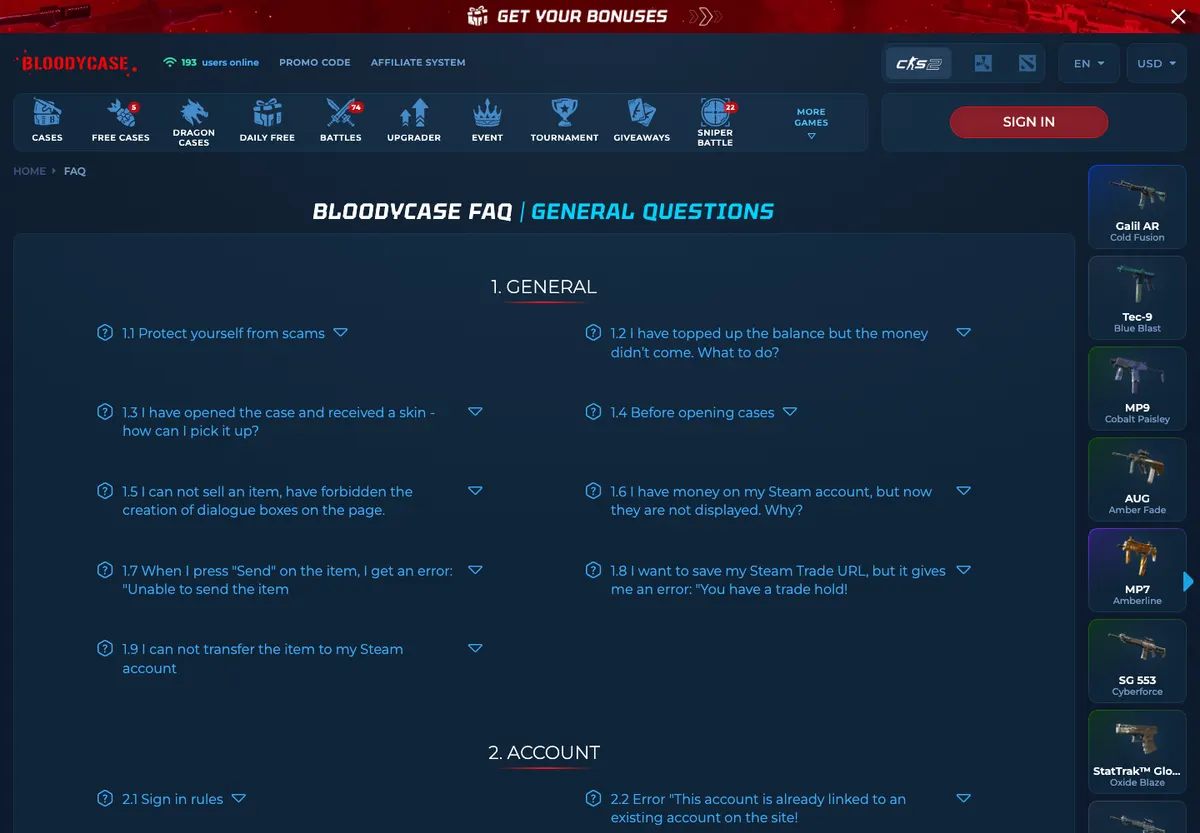
Email support@bloodycase.com for questions about activity on the official BloodyCase service. Its advertised 24/7 availability is not a guaranteed first-response or resolution time. The published contact statement does not specify a response deadline, so avoid planning around an assumed turnaround. A payment investigation, account-access problem and Steam delivery question may require different evidence even when they enter through the same address.
- Published support contact
- support@bloodycase.com; advertised availability is 24/7.[↗]
- Steam exchanges
- BloodyCase says exchanges run automatically through Steam bots and states that it is not affiliated with Valve.[↗]
- Opening verification
- The site says its provably fair system covers openings, including battles, and that results can be checked using server seeds.[↗]
| What happened | Where to start | Most useful evidence |
|---|---|---|
| A BloodyCase balance or case result looks wrong | BloodyCase support | Account identifier, activity reference, timestamp and balance or result screenshots |
| A payment left your payment account but is not reflected on site | BloodyCase support; use your payment provider for its own transaction status | Provider reference, amount, currency, status and payment time |
| A requested skin has not reached Steam | Check the Steam offer record, then contact BloodyCase about the withdrawal | Withdrawal reference, trade-offer ID and the exact status shown |
| You cannot access your Steam account | Steam's own account-recovery process | Account-access information requested through Steam's official recovery flow |
| You suspect an impersonator or unauthorized trade | Secure the affected account and report the relevant activity | Original messages, profile links, trade records and timestamps |
Do not treat a social-media profile, search advertisement or private message as a support channel merely because it uses the BloodyCase name. Google, Discord, Facebook and Twitch are listed among the site's login options, alongside Steam; a login option does not establish a customer-service channel. Start from the official site at https://bloodycase.com/ when checking current contact information.
Open https://bloodycase.com/ to check the current help information and your account records.
Links to the official BloodyCase site are independent and earn no commission. →
Prepare a request support can investigate
A useful support request connects an identifiable account to a specific event. Describe the expected outcome, the actual outcome and the point where they diverged. For example, distinguish a payment marked complete by its provider from a BloodyCase balance credit, or a withdrawal request from a completed Steam trade. These are separate events, and a screenshot of the final balance alone may not show which stage needs investigation.
- Account reference: include the visible BloodyCase account identifier or profile reference, if available, and the sign-in method used.
- Issue category: say whether the problem concerns login, a payment, site balance, a case result, an upgrade or a Steam withdrawal.
- Timing: give the date, approximate time and time zone. Explain if a provider or screenshot uses a different time zone.
- Event references: include the relevant payment, opening, battle, withdrawal or Steam trade-offer identifier when one is displayed.
- Expected versus actual outcome: explain what you selected, what the screen showed and what remains missing or incorrect.
- Technical context: for a display or login problem, include the device type, browser and exact error text.
- Checks already completed: list relevant checks without sending a long history of unrelated activity.
- Requested action: ask for a status check, explanation, account-access guidance or investigation of a named transaction.
Use a concise email template
Subject: BloodyCase support — [issue category] — [reference] Hello, I need help with [specific issue]. My account reference is [identifier], and I sign in using [method]. The event happened on [date and time, including time zone]. I expected [outcome], but the account or transaction currently shows [actual status]. The relevant reference is [payment, result, withdrawal or trade-offer ID]. I have already checked [relevant checks]. I have attached redacted screenshots showing [evidence]. Please confirm the current status and explain what action, if any, is needed from me.
Keep the original screenshots privately and send copies with unrelated personal details removed. Leave the transaction reference, relevant status and timestamp readable. If a video is useful, capture only the steps needed to reproduce the problem; avoid recording password managers, email inboxes or authentication screens. Never attach a password, recovery code, wallet seed phrase or Steam Guard approval code.
Resolve login problems without exposing your account
BloodyCase lists Steam, Google, Discord, Facebook and Twitch as registration or login methods. Begin with the method you originally used. A different sign-in route may not show the account context you expect; do not assume support can merge profiles or transfer a balance. Instead, explain which method previously worked and which account reference appears now, if any.
- Identify where sign-in stopsRecord whether the failure happens before the provider opens, during authentication, or after returning to BloodyCase. Copy the exact error instead of summarizing it as a broken login.
- Check the provider independentlyNavigate directly to Steam or the other login provider. If that account itself is inaccessible, use the provider's official recovery process rather than sharing its credentials with BloodyCase support.
- Rule out a local browser problemA fresh browser session or a different browser can help distinguish a session problem from an account problem. Note what changes. Do not disable account security or install an extension suggested by an unsolicited message.
- Send a focused access reportInclude the sign-in method, failure stage, error text and browser details. If you cannot reach account history, say so and provide an existing transaction reference that may help identify the account.
An unexpected Steam Guard prompt or approval request is not a routine troubleshooting step. Stop and verify what initiated it. Someone who offers to repair your account through remote access, a test trade or disclosure of an authentication code is asking for access rather than evidence. For a fuller access checklist, see BloodyCase login guidance.
Trace a deposit before trying another payment
BloodyCase publishes a $5 minimum deposit for opening paid cases. Its listed payment options include Visa, Mastercard, PayPal, Skrill, Bitcoin and USDT, among others, and it states that availability varies by country of residence. A method appearing in a general list does not establish that it will be offered in your checkout. If the problem is a missing payment option, describe the country and checkout message without trying to bypass location restrictions.
For card and e-wallet payments
As general payment guidance, a pending authorization, a completed charge and a merchant balance credit are different statuses. Read the wording in your bank or wallet record rather than assuming that a reduced available balance proves final settlement. Send BloodyCase the provider reference, payment time, amount, currency and status. A redacted receipt is more useful than a screenshot containing unrelated account activity.
If the provider shows a declined or reversed transaction, ask that provider what its status means. If it shows a completed payment but BloodyCase has not credited it, ask support to trace the reference. Do not send a full card number, security code or online-banking credentials. Do not make a replacement payment simply to see whether the first payment begins working.
For cryptocurrency payments
For a crypto query, record the asset, network, transaction hash, destination address shown during checkout and the status displayed by your wallet or exchange. The asset name alone may not identify the network used. Compare the original payment instructions with the transaction record, but do not send another transfer to correct a suspected mismatch without an explanation from the official support channel.
A transaction hash is an investigation reference, not a wallet recovery credential. Support does not need your private key or seed phrase to read a public blockchain record. Whether a mistaken transfer is recoverable depends on the circumstances; do not assume BloodyCase can reverse an external transaction. The published support contact statement gives no deposit-processing deadline. Ask for the status of your particular payment rather than relying on a generic estimate.
If the credited value differs from your expectation, request a breakdown of the payment amount, currency conversion and any applicable charge before alleging a missing credit. Do not apply Steam Community Market fees to a BloodyCase payment: Steam's market is a separate service using Steam Wallet funds. See deposit and withdrawal guidance and published fee information for the relevant distinctions.
Locate a missing skin in the withdrawal process
BloodyCase says won skins can be withdrawn to Steam, sold for site balance or used in Upgrade and Contract modes. These actions have different outcomes. Selling a drop for site balance is not a Steam withdrawal, and an item committed to another mode should not be treated as an untouched withdrawal request. First establish which action the account history records.
The site also publishes a requirement to top up at least $5 before withdrawing items to a Steam profile. That requirement is not a reason to send money to someone contacting you privately. If you believe the condition has already been met, provide the existing deposit reference and ask support to check it. Do not assume a further payment will resolve an unrelated delivery problem.
| Stage | What to inspect | What to tell support |
|---|---|---|
| Action recorded on BloodyCase | The selected item and whether the action was withdrawal, sale or use in a mode | Item name, action time and any displayed reference |
| Steam offer created | Your incoming trade-offer history, not just the inventory | Whether an offer exists and its trade-offer ID |
| Offer awaiting action or showing an error | The exact Steam message and the items on both sides | The current status without accepting an unexpected offer |
| Offer accepted or held | The trade record and any hold message | Acceptance time and the wording of the Steam status |
| Trade completed but item appears missing | The receiving account and the appropriate game's inventory | Completed trade reference and the item description shown in that record |
Check Steam details without weakening security
The following is general Steam guidance, not a separate BloodyCase rulebook. A trade link helps route offers to the intended Steam account; it is not a substitute for signing in or approving a trade. Check the intended receiving profile and whether the trade link you supplied belongs to it. If a setting needs updating, use Steam and the official site's own interface rather than a link sent by a stranger.
Valve describes a trade hold as Steam retaining items for a period before delivery, giving a compromised account's owner an opportunity to cancel a fraudulent trade. Steam Guard's mobile authenticator supports account security and trade confirmations. A hold message is therefore not automatically evidence that BloodyCase has refused delivery. Copy the message and ask which stage remains outstanding; do not disable protection in an attempt to accelerate the process.
Confirm the exact item, not just its picture
A Steam trade offer specifies the items on both sides. Read those details before confirming it. For CS2 items, the finish name, exterior wear, StatTrak designation where applicable, and other item attributes can distinguish visually similar skins. Float describes wear within the item's applicable range; rarity is a classification, not a promise of a particular value. Where available, preserve the detailed item description or inspect information rather than relying only on a thumbnail.
BloodyCase also lists Rust and Dota 2 cases, so include the game when reporting an item issue. Those games do not necessarily use CS2's item attributes. If an offer looks different from the withdrawal you requested, stop before confirming and ask support to identify it. A familiar bot name or avatar is not enough. The trade-safety guide explains the broader checks.
Explain balance and game-mode disputes precisely
For a balance query, reconstruct the relevant activity in order: the balance before the event, the action taken, the recorded result and the balance afterward. Distinguish a display that failed to refresh from an actual transaction discrepancy. If you refresh the page or sign in again, preserve the original evidence first. Avoid opening another case or using an item while trying to establish what happened to it.
In BloodyCase's published case-battle rules, users open the same cases and the player with the most valuable total drop takes all drops. An item appearing during your battle does not, by itself, establish that it should remain in your inventory afterward. For a settlement query, identify the battle, your participant position, the displayed totals and the final allocation you believe is inconsistent with the rules.
The Upgrader description says users stake skins, optionally with balance, toward a more expensive target. It also says an unsuccessful attempt loses the staked skin or balance, with cashback credited. Cashback does not mean the original stake is returned. If the recorded settlement appears wrong, provide the staked items, target, displayed chance, result reference and relevant balance entries. Ask for an explanation of the specific calculation rather than assuming an unfavorable result is a technical failure.
Preserve evidence for a fairness question
BloodyCase states that its openings, including battles, use a provably fair algorithm and that results can be verified using server seeds. If your question concerns a result, save the opening or battle identifier and any verification information shown for that event. A screenshot of the animation alone may not contain enough information to reproduce or check the underlying result.
In general, provably fair verification uses cryptographic commitments and disclosed inputs to check how a result was produced. The exact inputs and calculation depend on the implementation. Ask support where to find the verification record for your event and how to reproduce it. Do not substitute a verifier from another brand or assume that similarly named fields use the same calculation.
Separate an input mismatch, an inability to reproduce a calculation and dissatisfaction with the outcome. They require different explanations. Provably fair does not mean every opening has favourable value or that losses will be refunded; games of chance carry a house edge. Use the provably fair guide to understand the terminology, then ask a narrowly framed question about the event you saved.
Protect your evidence from support impersonators
Public complaints can attract people pretending to be staff. Keep the detailed investigation in the email thread you initiated using the published address. A display name, copied logo or reference to your public post does not establish identity. If a reply redirects you to a different address or asks you to install software, verify the request through contact details reached independently from the official site.
- Never disclose a Steam password, Steam Guard code, recovery code, wallet seed phrase or private key.
- Do not approve a test trade, transfer an item for inspection or send a payment to a private contact claiming to unlock support.
- Keep full payment receipts and account identifiers out of public posts; share only what is necessary through the verified contact route.
- If identity documents are requested, first ask why they are needed and where the secure submission process is located.
- If an unauthorized trade is involved, preserve its original record before changing account settings or deleting messages.
The published support contact statement does not describe a document-upload procedure. Do not invent one or assume that an attachment request from an unfamiliar sender is legitimate. If you believe an account is compromised, prioritize the affected provider's official security and recovery tools. Reporting a loss does not establish that an item can be restored, so avoid making further transfers while waiting for an explanation.
Follow up with a clear record
Keep your sent email, attachments and any case reference together. If an acknowledgment arrives, retain it, but distinguish receipt from resolution. Check spam or junk folders for replies. When following up, continue the existing thread where possible so the original evidence remains visible. Opening unrelated conversations about the same event can make it harder to see which facts have changed.
A useful follow-up says what remains unresolved and adds genuinely new information: a payment status changed, a Steam offer appeared, or a requested screenshot is now attached. Ask whether the investigation needs further evidence and which party currently controls the next step. If an answer addresses the wrong transaction, restate the exact reference rather than resending an unexplained collection of screenshots.
For a disputed decision, request the factual basis and the applicable rule, including how it applies to your event. Do not assume a particular escalation department, refund entitlement or external dispute service exists merely because another platform offers one. A bank, payment provider or consumer-advice service can explain its own processes where relevant. Keep those discussions accurate and separate from any promise of a BloodyCase outcome.
Ask for account restrictions when you need a break
If spending or repeated case-opening is becoming difficult to control, make that the subject of the request rather than treating it as a routine balance question. Tell support that you want to stop accessing paid play and ask which account restrictions or closure options are available. Ask how any remaining balance or pending withdrawal would be handled. Do not assume a particular self-exclusion tool or account-limit feature is offered without confirmation.
You do not need to keep playing while waiting for a reply. Step away from the site, avoid further deposits and consider independent gambling-support resources available locally. In Ontario, ConnexOntario can be reached at 1-866-531-2600. The responsible-gambling guide explains warning signs and practical ways to reduce access. Support can answer account questions, but it is not a substitute for independent help with harmful gambling.
BloodyCase support FAQ
No matching questions found.
What is the BloodyCase support email?
Is BloodyCase support available around the clock?
Can I use Discord to get support?
What should I send about a missing deposit?
What should I send about a missing Steam withdrawal?
Can BloodyCase support remove a Steam trade hold?
Does selling a skin mean money is sent to my bank?
Can support refund an unsuccessful opening or upgrade?
What if I cannot access my account history?
Should I post my full complaint publicly?
This independent guide is for informational purposes and is not affiliated with BloodyCase.