








Links to the official BloodyCase site are independent and earn no commission. · Link disclosure
Best CS2 Skins
  • Last updated:
  • 21 min read
  • 8 Sections

This page is informational; do not treat it as confirmation that players from New Zealand are accepted or that the service is authorised here. Want to understand BloodyCase before depositing, or resolve a problem with an account, case or Steam withdrawal? These answers separate BloodyCase's documented rules from general Steam and skin-trading guidance. The brand offers CS2, Rust and Dota 2 cases, requires no separate case keys, and lets users withdraw won items to Steam or sell them for site balance. Start with the relevant topic below, check the terms attached to your chosen action, and contact the official support address when an account-specific answer is needed.

For a complete walkthrough, use how BloodyCase works. For a stuck transaction, go to deposits and withdrawals. If you have received an unexpected Steam offer, read trade safety before confirming anything. Account-specific issues belong with official BloodyCase support.
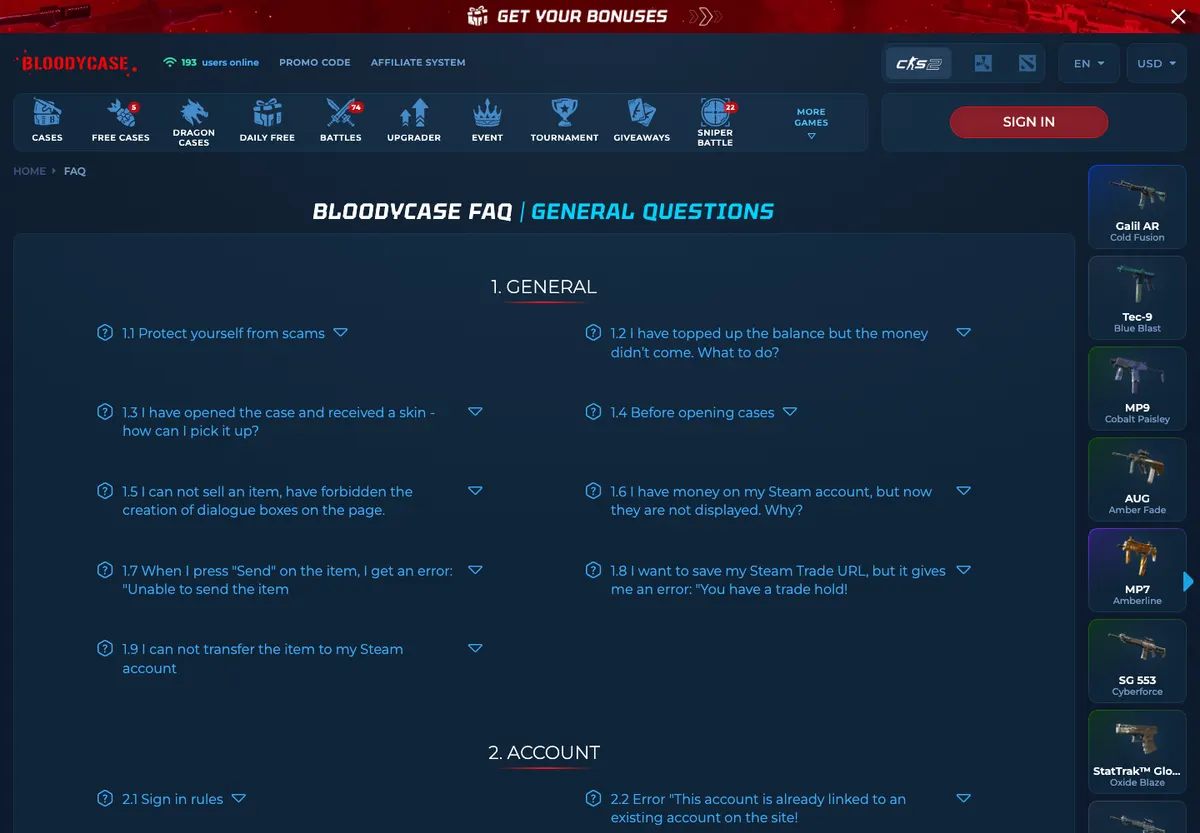
Screenshot of the BloodyCase FAQ page in a public signed-out view
bloodycase.com

Understand the service before you start

What is BloodyCase, and which games does it support?
BloodyCase is a skin case-opening service with CS2 cases and additional cases for Rust and Dota 2. Its documented activities include case battles, an upgrader, contracts and promotional case programmes. Won skins can be withdrawn to Steam, sold for site balance, or used in Upgrade and Contract modes. Those are different actions: receiving an item, keeping spending balance on the site and risking an item in another mode should not be treated as interchangeable. Choose the game first, then examine the particular case or mode. See supported games for the differences between their items.
Who operates BloodyCase, and is it part of Valve?
The official site's footer names Sky Apex Group Ltd, registration code HE491931, at Avlidos 4, Mesa Geitonia, 4002 Limassol, Cyprus. BloodyCase explicitly says it is not affiliated with Valve. It also says exchanges happen automatically through Steam bots. Using Steam accounts or Steam trade infrastructure does not make a third-party service a Valve product, and company registration is not the same thing as a gambling licence. When checking a transaction or legal question, use the current operator details in the official terms rather than assuming Steam is responsible for the service.
Can I use BloodyCase from my country?
Check the official terms and the rules that apply where you live before creating a funded account. BloodyCase states an age-of-majority requirement; this guide treats games of chance as 18+ only, without overriding a higher local threshold. A visible homepage, an available payment logo or a successful sign-in does not establish legal eligibility. Payment availability also varies by country, but payment access and permission to gamble are separate questions. Do not use location-masking tools to get around restrictions. If the terms leave your situation unclear, ask support before sending money rather than testing eligibility with a deposit.
Do I need a CS2 key to open a BloodyCase case?
No. BloodyCase states that its cases do not require separate keys. That describes opening a case on BloodyCase, not opening a container inside the game client. Check the displayed case cost and any conditions before proceeding; no separate key does not mean there is no cost. A random opening also differs from buying a named item directly: the result comes from the case's possible contents rather than your choice of a specific skin. If your goal is one particular item, compare that with a direct purchase instead of assuming repeated openings will deliver it.

Get into the right account safely

Which login methods does BloodyCase offer?
BloodyCase lists Steam, Google, Discord, Facebook and Twitch as registration or login options. Choose the provider attached to the account you intend to use, especially if you already have a balance or item history. Authentication through a provider and having a Steam destination ready for item delivery are separate matters. Before authorising a sign-in, check the address of the authentication page and the permissions shown. Do not enter a provider password into an unrelated form sent by a stranger. The login guide explains the distinction between accessing an account and preparing it for Steam trades.
Why does signing in with another provider show an empty account?
First check whether you used the same provider and the same provider account as before. Do not assume that matching email addresses automatically merge Steam, Google or other sign-ins; BloodyCase's listed login options alone do not establish an account-linking policy. An apparently empty profile is a reason to stop and identify the correct account, not to deposit again. Compare any profile identifier, previous receipts and the login route you normally use. Ask support to clarify the account relationship without sending your password. Avoid creating more profiles while trying to resolve an existing balance or inventory issue.
What should I check if sign-in fails or keeps returning to the login screen?
As general browser troubleshooting, confirm that the identity provider itself is accessible, check that the browser is not blocking the authentication flow, and retry from a clean browser session. Temporarily changing an extension setting can help identify a local conflict, but do not disable account security to make a login work. Record the exact error text and where it appears: a provider error and an error after returning to BloodyCase may need different attention. Never respond to a failed login by accepting help from an unsolicited account. If the problem persists, send support the provider name, approximate time and a redacted screenshot.
What is a Steam trade URL, and how should I handle it?
In general Steam use, a trade URL lets someone send a trade offer to the intended account. It is not your Steam password, and it does not authorise a trade by itself. If a withdrawal form requests one, obtain it from your own Steam trade-offer settings and check that it belongs to the Steam account intended to receive the item. Avoid posting it publicly or copying it from another person's instructions. A correct destination does not remove the need to inspect an incoming offer. BloodyCase-specific validation requirements should be checked in the current withdrawal interface rather than inferred from general Steam guidance.
Does Steam Guard matter for withdrawals?
Yes, Steam account security matters whenever items are moving, although Steam's requirements should not be confused with a separate BloodyCase rule. Valve describes the Steam Guard Mobile Authenticator as providing two-factor authentication for trade and market confirmations. Use Steam's own account notices to understand your current eligibility and any restrictions. Do not remove the authenticator because someone claims that doing so will speed up an item delivery. Changes to account security can affect trading, and a third-party support agent cannot simply override Steam's controls. The trade-safety guide explains what to inspect before confirming an offer.

Check deposits, payment methods and costs

What is the minimum BloodyCase deposit?
BloodyCase states a minimum deposit of $5 for opening paid cases. It also states that withdrawing items to a Steam profile requires a balance top-up of at least $5. These are the brand's stated amounts, not NZD amounts or a recommendation to spend. Do not interpret the deposit minimum as the price of every case or a promise that your preferred payment method will process that amount. Check the live payment screen for the amount payable and the balance to be credited. A deposit commits money to the service, so decide on an affordable entertainment budget before authorising it rather than starting from the minimum the checkout accepts.
Does BloodyCase accept cards, PayPal or cryptocurrency?
The published payment list includes Visa, Mastercard, PayPal, Zen, Skrill, Neosurf, Neteller, Sofort, Paysafecard and SkinsBack. Listed cryptocurrencies include USDT, Bitcoin, Ethereum, Dogecoin, Cardano, Ripple, Litecoin, Polygon and Shiba Inu. BloodyCase says methods may vary with country of residence, so a logo in a general list is not a promise that it will appear in your checkout. Select the method actually offered to your account, read the provider's instructions and check the final confirmation. Deposit support also does not establish that the same method is available for withdrawing money; documented item withdrawals are to Steam.
My payment was sent, but the balance has not appeared. What now?
Start by checking the payment provider's status and the transaction record in your BloodyCase account. A payment marked pending by a provider is different from one marked completed but not reflected in the site balance. Save the receipt or transaction reference, the amount, currency, payment method and approximate time. Do not send another deposit simply to see whether the balance updates, and do not pay someone who claims an extra transfer will release it. If the records do not explain the discrepancy, contact support with the evidence. Keep card security codes, passwords and unrelated financial information out of your message.
What fees should I check before paying or selling an item?
The public payment descriptions do not provide a complete, method-by-method fee schedule. Check the transaction screen for the amount charged, any provider cost, currency conversion and the amount credited. When selling an item for balance, compare the actual offered credit with the value you expected rather than assuming different price displays are interchangeable. General Steam Community Market fees are separate: Valve's market purchase interface displays its own fee lines. Neither a Steam fee nor another site's commission establishes a BloodyCase rate. The fees guide explains how to compare costs without inventing an unpublished percentage.
What should I check before making a crypto deposit?
Use the address, asset and network specified by the current payment instructions. A familiar ticker alone is not enough to establish that every network carrying that asset is accepted. Check the requested amount and any payment reference before sending, then retain the transaction hash for troubleshooting. These are general crypto-payment precautions, not a separate BloodyCase network policy. Transfers sent using incorrect details can be difficult or impossible to recover. Crypto also carries value and security risks beyond the case-opening activity itself. If the checkout and your wallet disagree about the network or destination, stop and ask for clarification instead of sending a test payment.

Choose a case or mode with clear expectations

What should I inspect before opening a case?
Check the game, displayed price, possible contents and any probability information available for that particular case. A case illustration is not a promise that its most prominent item will be your result. Read any attached eligibility or promotion conditions before spending balance. Decide beforehand what you will do with the result: withdraw it, keep it on the site or sell it for balance. That decision can prevent an unwanted sequence of further wagers after a disappointing opening. If the case page does not make an important condition clear, do not fill the gap with assumptions. Use the cases guide for a focused checklist.
How do BloodyCase case battles work, and can they be private?
BloodyCase describes case battles as several users opening the same cases, with the player whose drops have the highest combined value taking all the drops. It states that fully private battles cannot be created. This is not simply a normal opening with a social display: the comparison with other participants changes who receives the items. Read the battle details before joining and do not assume that obtaining a valuable individual drop means you keep it. Where a particular situation, such as a tied total, matters to your decision, consult the current rules rather than borrowing an answer from another service.
How does the BloodyCase Upgrader work?
The Upgrader lets users stake skins, optionally with balance, for a more expensive target skin. BloodyCase says the chance depends on the value ratio. On a loss, the staked skin or balance is lost, while cashback is credited; the published description does not justify assuming a particular cashback amount. Listed displays include Upgrade strip, Classic, Wheel and Fill. Do not treat a different animation as evidence of a better return. Compare the stake, target, displayed chance and loss consequence before confirming. An upgrade is another wager, not an item-maintenance tool or a way to repair an earlier loss.
Are contracts, sniper battles and tournaments the same as ordinary cases?
No single rule set should be assumed across all of them. BloodyCase's navigation lists contracts, sniper battles, tournaments, events and giveaways alongside cases, case battles and the upgrader. That establishes their presence, not identical participation costs, scoring or settlement rules. For any mode you are considering, identify what you commit, what determines the outcome and what happens to the committed balance or items. Read eligibility and reward conditions separately for promotional activities. If those essentials are unclear, skip the activity until they are explained. The game-modes guide separates the documented mechanics from rules that need checking on the current screen.
Why can skins with similar names have different values?
As general CS2 item guidance, a skin's full identity can include its weapon, finish, wear category, float, pattern and special attributes such as StatTrak. Float describes wear within the item's applicable range; rarity is a different characteristic and does not describe its physical-looking condition. Stickers and other item-specific details can also matter to a buyer. Do not apply CS2 wear labels automatically to Rust or Dota 2 items, whose attributes differ. When comparing a displayed drop with a Steam offer, inspect the complete item details rather than only the artwork. See the skin glossary for these terms.

Read promotional conditions before opting in

Do the advertised signup cases require a deposit?
Yes. BloodyCase advertises 5 promotional cases for new users, but its stated condition is a mandatory $5 deposit to unlock them. Each user can open that allocation only once. The same promotional page also states a minimum $5 top-up requirement for withdrawing items to Steam. Those statements do not, by themselves, establish that an additional separate deposit is required after a qualifying top-up; check your account's actual eligibility. Treat this as an explanation of the deposit-linked promotion, not an endorsement or a reason to deposit. The stated amounts are not specified as NZD. If you would not otherwise choose to spend that money, the case allocation is not a reason to change your budget.
How do Dragon Cases work?
BloodyCase describes Dragon Cases as a deposit-linked programme with 10 levels based on cumulative deposits. Its rules state that a daily Dragon case is available and unopened cases expire. That is a promotional eligibility structure, not evidence that depositing more improves the outcome of an individual opening. Check the level conditions and your account's entitlement before relying on a particular reward. An expiry condition should not dictate your schedule or prompt extra spending. It is reasonable to leave a promotional case unused, especially if returning to claim it would encourage activity beyond the limits you set for yourself.
Where should I check a promo code or bonus claim?
Use the current official promotion page and the terms shown before activation. A code copied from a video, comment or message may be outdated, account-specific or unrelated to the offer you are viewing. Check eligibility, the qualifying action, the type of credit or reward, and any restrictions attached to it. Do not assume promotional balance works exactly like deposited balance or that a headline offer explains withdrawal eligibility. This FAQ does not supply an unconfirmed code. If an offer is unclear, ask support about that specific promotion and keep its name or a screenshot so the answer can address the correct conditions.

Move items to Steam without confusing balances

Does selling a BloodyCase skin send cash to my bank?
The documented sale route credits site balance; it should not be read as a bank payout. BloodyCase says won skins can instead be withdrawn to Steam or used in Upgrade and Contract modes. For promotional-case items, it describes a sale action with immediate credit to the account balance, but that timing concerns internal credit, not external payment. Steam Wallet funds are another separate category: Valve's Community Market uses them for purchases and sales. Before clicking a sale or withdrawal control, identify exactly what you will receive and where it will appear. An on-screen value is not automatically withdrawable cash.
What should I check before requesting an item withdrawal?
Confirm that you are in the intended BloodyCase account, that the destination Steam account is correct, and that the item selected is the one you want to receive. Check the stated top-up requirement and any current instructions shown with the withdrawal. As general Steam preparation, inspect account notices for restrictions and ensure you can access trade confirmations. After requesting delivery, use the site's transaction status and your own Steam trade-offer page to follow the process. Do not accept a different item or send an unrelated item because a message says it is needed to complete the withdrawal.
How long do BloodyCase item withdrawals take?
BloodyCase says exchanges run automatically through Steam bots, but automation is not a universal delivery deadline. Its public withdrawal description does not give a single processing time covering every request. Distinguish an item still pending on the site from a Steam offer awaiting your response, an account restriction or a Steam-held trade. Each is a different troubleshooting situation. Record the withdrawal reference and check both the site status and Steam before contacting support. Avoid repeatedly starting new requests while the original status is unclear. Support can investigate the recorded request more effectively when you can identify exactly where progress stopped.
What is a Steam trade hold, and can BloodyCase remove it?
Valve describes a trade hold as a period when Steam holds items before delivery, giving an owner of a compromised account an opportunity to cancel a fraudulent trade. That is a Steam security mechanism, not a BloodyCase fee. Read the notice on your own account to understand what applies; do not rely on an old guide's timing or another user's account status. A third-party service cannot simply remove a restriction imposed by Steam. Also distinguish delivery holds from restrictions on trading an item again after receiving it. Do not pay a supposed administrator to bypass either kind of restriction.
What if the incoming offer looks wrong or another offer disappears?
Do not confirm an offer with unexpected items, an unexpected request from your inventory or a counterparty you cannot reconcile with the withdrawal instructions. In general Steam trading, a Trade Offer specifies the items on both sides, so inspect the actual contents rather than trusting a display name or avatar. Pending offers can also conflict when they involve the same item; an expired offer alone does not identify the cause of a site-side problem. Compare your Steam history with the withdrawal record and contact support if they disagree. Keep suspicious messages as evidence, but never follow their requests to transfer items elsewhere.

Understand what provably fair does—and does not—show

Does BloodyCase claim to use provably fair results?
Yes. BloodyCase states that a provably fair algorithm applies to openings, including battles, and that results can be verified using server seeds. That is a claim about checking how an outcome was generated, not a certification of every aspect of the service. Payment handling, account security, item availability and legal eligibility remain separate questions. Before relying on the feature, locate the verification information for the particular result and understand what it demonstrates. The provably fair guide explains the concepts without assuming an unpublished BloodyCase formula or presenting another brand's verifier as its own.
How does a seed-and-hash check generally work?
In a common provably fair design, the operator commits to hidden information by publishing a cryptographic hash before the result. After the underlying seed is revealed, a user can check that it matches the earlier commitment and reproduce the calculation using the specified inputs and mapping rules. Client seeds and a round counter may also be involved, depending on the implementation. This is a general explanation, not a claim that BloodyCase exposes every field in that exact format. Preserve the round identifier and any available commitment, seed and result details. Verification requires the actual documented algorithm, not just a matching-looking animation.
Does provably fair mean a case is good value or that a loss is due to reverse?
No. A reproducible result can still come from a game with a house edge. Fairness verification and value are different questions: one concerns whether the result follows the committed process, while the other depends on probabilities, costs and what the possible outcomes are worth to you. A losing sequence does not establish that the next result must compensate for it. Do not use a verifier, a recent-results feed or another user's expensive drop as a reason to increase your stake. If an opening exceeds your entertainment budget, the ability to check its result does not make it affordable.

Get useful support and know when to stop

How do I contact BloodyCase support?
BloodyCase advertises support at support@bloodycase.com, available 24/7. Use that published address for account, payment and item-delivery questions. Give the message a specific subject, such as a missing balance credit or a pending item withdrawal, and describe what happened in order. Include the relevant account identifier and transaction reference without sharing credentials. Someone who contacts you first through a social platform is not authenticated merely by using a support-themed name. If a message asks for passwords, recovery codes, remote access or an unrelated item transfer, stop and verify the request through the published channel.
Does 24/7 support mean an immediate reply or resolution?
No fixed reply or resolution deadline follows from an advertised support-availability statement. A case may require a payment reference, account checks or a comparison with Steam transaction records. Send a complete initial report and retain the correspondence so that any follow-up refers to the same issue. When adding information, explain what changed rather than resending an unexplained screenshot. Avoid publishing sensitive account details in comments while waiting. If the matter concerns a payment provider's own status or a Steam account restriction, keep those official records available as well; they can help distinguish the systems involved without assuming which party caused the problem.
Will support ask me for identity documents?
A universal BloodyCase identity-check trigger and document list are not stated in the basic account guidance. Do not assume either that documents will always be required or that a particular payment method rules checks out. If a request arrives, confirm it through the official support channel, ask what is required and why, and use the submission route specified in the verified correspondence. Do not attach identity documents to an initial troubleshooting email unless they have been appropriately requested. Passwords, authenticator codes and recovery codes are not substitutes for identity evidence and should not be handed to someone claiming to assist you.
Does Steam integration make BloodyCase safe to use?
Steam integration answers how an account or item transfer may connect to Steam; it does not remove payment, account-security or gambling risks. BloodyCase itself states that it is not affiliated with Valve. Evaluate each decision separately: whether you are legally eligible, whether you understand the mode, whether the transaction details match your intention and whether the spend is affordable. Protect your provider accounts and inspect trade contents yourself. In New Zealand, the Department of Internal Affairs says advertising overseas gambling is prohibited; an online casino licensing regime is being introduced. A company address or Steam login is not a substitute for applicable authorisation.
What should I do if I am chasing losses or spending more than planned?
Stop opening cases and avoid depositing to recover what you have already spent. Treat repeated budget changes, borrowing, hiding activity or feeling unable to leave an expiring promotion unused as reasons to step away. Ask official support what account restrictions or closure options are available; do not assume a particular self-exclusion tool exists without checking. Remove saved payment access where appropriate and speak to a trusted person or a gambling-support service in your location. The responsible-play guide offers practical next steps. If your real goal is a specific cosmetic item, reconsider whether any random-opening activity serves that goal.

Prepare a support request that can be investigated

  1. Identify the account and actionState the login provider, an appropriate account identifier, and whether the issue concerns authentication, payment, a game result or an item withdrawal.
  2. Attach the relevant referenceProvide the payment reference, crypto transaction hash, withdrawal identifier or round record that corresponds to the problem, rather than unrelated account history.
  3. Describe the expected and actual resultExplain what you selected, what the interface displayed and what happened instead. Add the approximate time and time zone so records can be compared.
  4. Redact and retain evidenceKeep useful error text and transaction details visible, but remove credentials, security codes and unrelated personal information. Save your original records and the support correspondence.

If you are eligible and choose to proceed, review current case details, payment instructions and terms at https://bloodycase.com/ before committing funds.

Visit BloodyCase

Links to the official BloodyCase site are independent and earn no commission. →

This independent guide is for informational purposes and is not affiliated with BloodyCase.

Related pages

ReviewBloodyCase review for New Zealand covering CS2, Rust and Dota 2 cases, the US$5 minimum deposit, Steam withdrawals, payment methods and provably fair checks.Open section SupportNew Zealand: BloodyCase's licensing status is unverified. Contact support@bloodycase.com, advertised 24/7, about account, payment or trade issues.Open section LoginNo BloodyCase licence for New Zealand has been confirmed. Learn about Steam sign-in, access issues and account security; support is advertised 24/7.Open section HomeNew Zealand: independent BloodyCase information on CS2, Rust and Dota 2 cases, battles, upgrades, and published deposit and Steam withdrawal information.Open section How It WorksLearn how BloodyCase works in New Zealand: sign in, add a Steam trade link, check US$5 minimum deposit, open CS2 cases and withdraw awarded skins to Steam.Open section Supported gamesNew Zealand: BloodyCase CS2, Dota 2 and Rust cases. Compare skin details, Steam withdrawals and item eligibility; licensing and availability are unverified.Open section Fees & pricesCheck BloodyCase fees, the $5 deposit minimum, CS2 case prices, Steam withdrawals and payment costs before you add balance or open a case in New Zealand.Open section Trade safetyNew Zealand: check BloodyCase Steam bot trades, Steam Guard and trade holds. Learn the $5 withdrawal requirement and how to verify offers before confirming.Open section CasesCompare BloodyCase cases for CS2, Rust and Dota 2. Check the US$5 deposit minimum, no-key opening, drop information and Steam withdrawals in New Zealand.Open section Game modesCompare BloodyCase CS2 cases, battles and Upgrader modes in New Zealand, including Classic and Wheel, plus rules to check before staking skins or balance.Open section Provably fairNew Zealand: Check BloodyCase provably fair claims for CS2 cases and battles. See how server seeds, hashes and result checks work, and what they cannot prove.Open section Deposits & withdrawalsNew Zealand: BloodyCase has no confirmed Department of Internal Affairs licence. Listed deposit methods, $5 minimum, Steam skin withdrawals and trade safety.Open section
Independent guide

Explore BloodyCase

Visit BloodyCaseRead the review

The primary link goes to BloodyCase's official site.